Every window, with its reset time.
Work and personal profiles, or a second CODEX_HOME, each keep their own limits. Claude figures refresh after every reply.
Claude Codework
Claude Codepersonal
Codex
Sample data
Every Claude Code and Codex session at a glance. Know the second one needs you, and see how much of your plan is left.
$ curl -fsSL https://raw.githubusercontent.com/kushalBanda/OpusBar/main/scripts/install.sh | bashFree and open source · macOS 14+ · Apple silicon and Intel
Prefer a disk image? Download the DMG
1 needs you · 4 active
payments-apiClaude Code
Needs you · Allow Bash?
design-systemClaude Code
Done
web-appClaude Codemain
Working · Edit
infraCodexcdn-cache
Working · shell
ml-pipelineCodexevals
Thinking
Sample sessions
A refactor in one terminal, a test fix in another, and Codex working on a migration behind your browser. One of them has waited on a permission prompt for ten minutes, and you find out only when you go and look.
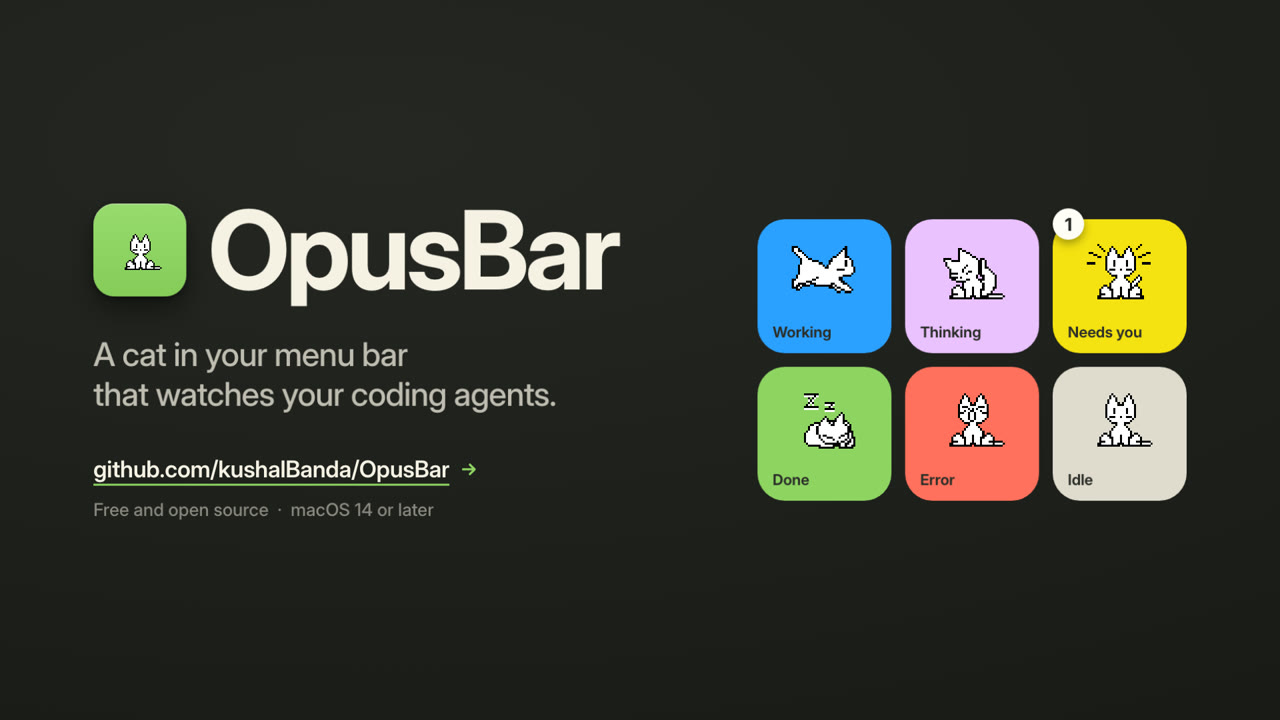
OpusBar puts every running session in your menu bar. The cat shows the state of the most urgent one.
Working
A session is calling tools: editing files, running tests, using the shell. The cat runs while the work happens.
The model is reasoning before it acts. Nothing for you to do yet, so the cat cleans its paws.
A permission prompt or a question is waiting. The cat sits up, a badge counts the waiting sessions, and a notification tells you which one.
The session finished its turn. The cat takes a nap until you give it more work. A ping for finished sessions is optional.
The session stopped on an error. You get a notification, and the badge marks it until you look.
Nothing is running. The cat sits and waits, and stops animating so it uses no CPU.
Sound on.
Your 5-hour and weekly windows for every Claude Code and Codex account, read straight from your agents' own logs. Your history is there on first launch.
Work and personal profiles, or a second CODEX_HOME, each keep their own limits. Claude figures refresh after every reply.
Claude Codework
Claude Codepersonal
Codex
Sample data
OpusBar warns at 80% and 95% of a window, and tells you when a window renews.

OpusBarnow
Claude Code limit 80% used
5-hour window · resets in 1h 12m
OpusBar2h ago
Your Claude Code window renewed
5-hour window · 100% left
Tokens over 24 hours, 7, 30 or 90 days, by agent, account, model and project. Next to them is the API value: what the same tokens cost at Anthropic's and OpenAI's list prices. On a subscription, that is what your plan covers.
API value Claude Code Codex
$2,815 8.9B tokens
Sample data
Twenty-one coats, from the original 1989 oneko to Catppuccin and Vaporwave. Pick one here and every cat on this page changes to it. In the app you also pick the pose for each state and the cat's size.
No account, no telemetry, no analytics. Here is the complete list.
.git/HEAD, for the folder and the branch name.~/Library/Application Support/OpusBar.The hook has a 200 ms deadline and exits quietly when OpusBar is not running, so your agents never wait on it.
Paste this into Terminal. The script downloads the latest release, checks its SHA-256, puts OpusBar in Applications and opens it. Read the script first if you like.
$ curl -fsSL https://raw.githubusercontent.com/kushalBanda/OpusBar/main/scripts/install.sh | bash/hooks once and approve OpusBar's.Download the DMG Star on GitHub
The DMG is not notarized by Apple yet. Open the app once, then go to System Settings › Privacy & Security and click Open Anyway. The Terminal install skips this step.
Yes. OpusBar is free and open source under the Apache 2.0 license.
Claude Code and Codex, in any terminal, tmux pane or editor. Running agents show up within 30 seconds, even before you connect anything. Connect them in Settings and the cat also knows what each session is doing. Codex needs version 0.155 or later for hooks.
No. Everything stays on your Mac. The hook drops your prompts, code and replies before they reach OpusBar. The only network request is a daily update check to GitHub that carries OpusBar's version, and you can turn it off in Settings › About.
Yes. It shows your 5-hour and weekly windows for every Claude Code and Codex account, with the time each one resets, and warns at 80% and 95%. Claude limits appear after the first reply in a connected session.
No. The menu bar cat never draws more than 4 frames a second, stops 30 seconds after the last change, and holds still when Reduce Motion is on. Once still, it uses no CPU.
On a MacBook with a notch, a crowded menu bar hides items behind it. Hold ⌘ and drag other icons out of the menu bar to make room.
In Settings › Agents, click Disconnect for each agent first. This removes the hooks and puts your own status line back. Then quit OpusBar and drag it to the Trash. Optionally, delete ~/Library/Application Support/OpusBar.